Meet Semantic Scholar: Your AI-Powered Research Assistant
So you’ve spent more hours than you care to admit searching online for those “just right” articles (using the Library’s databases, or Google Scholar). Help is at hand, there’s a free tool you should know about: Semantic Scholar (semanticscholar.org). Developed by the Allen Institute for AI. Semantic Scholar uses AI to manage the task of finding and evaluating scholarly literature more efficiently. Think of it as Google Scholar’s smarter, more organized sibling.
Where Does It Find Its Content?
This is a really good question. You’ve probably already tried similar tools and found that they pretty much only return open-access items, which is OK, but Semantic Scholar does more by finding items that are both public and from proprietary data sources (ie, through a subscription database or a publication behind a paywall). You’ll find that other tools often cite Semantic Scholar as one of their primary sources of information.
What this means is that currently, Semantic Scholar draws from over 200 million papers, 80 million authors, and more than 2.4 billion citation connections. It indexes material across a wide range of disciplines, including education, psychology, social sciences, and the humanities — all areas relevant to Bank Street’s GSE community.
It’s true that coverage is strongest in computer science, AI, and biomedicine, and does lag behind specialized databases you might find in the education and social science domains. What this means is that you should use it alongside the Library’s subscription databases (e.g., EBSCOhost and ProQuest).
What Makes It Different?
Here’s what sets it apart:
AI-Powered Search. You can search using natural language rather than having to construct elaborate boolean strings, subject headings, or keywords.
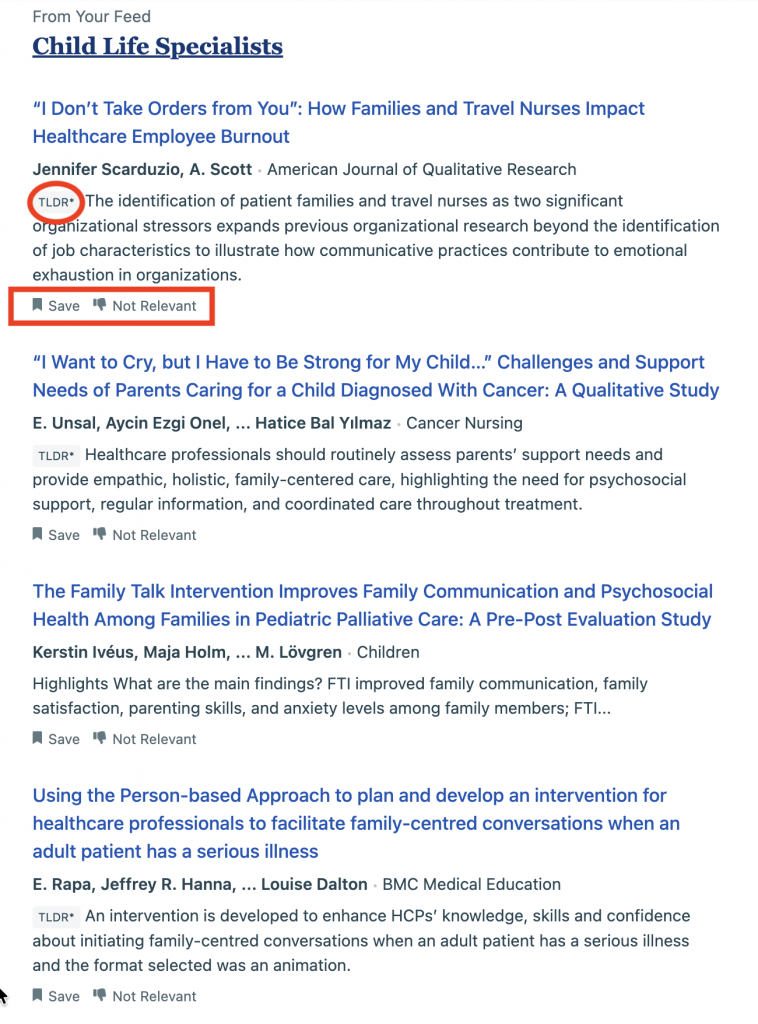
TLDR Summaries. Each paper comes with a one-sentence AI-generated summary so you can quickly decide whether a source is worth reading — a real time-saver when you’re scoping a literature review. If you’re wondering what TLDR means, it’s an acronym for “too long, didn’t read.”
Highly Influential Citations. Semantic Scholar distinguishes citations that meaningfully shaped a paper from incidental mentions, helping you identify the truly foundational works in a field rather than just the most frequently cited ones.
Your Personal Library. Once you create a free account, you can save papers into organized folders, export citations in bulk, and build a working collection as your literature review takes shape.
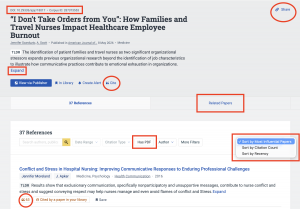
What I like. Straight up, I like the fact that there’s a DOI in the top left corner; you can share this citation with a colleague in the top right, and if you want to read more than the TLDR summary, you can do that with the expand button. I also like the options to see “highly influential papers” and “most cited,” along with papers that are recent. If there is an open-access PDF, you can find it here.
The Weekly Email That Works for You
One of the most useful features for busy faculty is Research Feeds — and it’s worth taking five minutes to set it up.
Here’s how it works: once you’ve saved some papers into a library folder, Semantic Scholar’s AI automatically suggests newly published papers based on the content of your folders, helping you stay current without having to search manually every day.
When you create a Research Feed, you can refine it over time by rating papers — marking relevant ones as “More Like This” and less relevant ones as “Less Like This” — and Semantic Scholar learns your preferences. The more you interact with it, the sharper your recommendations become.
You can then choose to receive email alerts either once a day or once a week, delivered to whatever email address you prefer. So instead of remembering to check back, the latest research in your area simply arrives in your inbox. Below is a screenshot of a week’s worth of new articles on one of my topics, “Child Life Specialists.”
A Good Starting Point for Literature Reviews
For GSE folks building a literature review, here’s a simple workflow to try:
- Search your topic using natural language at semanticscholar.org
- Save the most relevant results to a library folder
- Set up a Research Feed based on that folder
- Turn on weekly email alerts so new relevant publications find you
- Follow the citation trails — Semantic Scholar makes it easy to see what papers cited a key work and what works a paper builds upon.
Want Help Getting Started?
Stop by the library or email us — we’re happy to walk you through setting up your account and Research Feeds.
Generative AI
I used Claude Sonnet 4.5 to help create a framework for this blog post. Here is my prompt:
Help me write a blog post for the faculty of a graduate school of education about how Semantic Scholar works, and how it can find resources for them to create a literature review. Talk about where Semantic Scholar finds resources, and also about the email it sends out weekly.
I used the AI outline provided, but changed a lot of the language.